
To create Stripe discount code please follow the steps listed below:
1.Login to your Stripe account.
2.Select ‘Product Catalog’ from the menu on the left. Then select Coupons tab on the top.
3.Press ‘+New’ btton at the top right corner.
4. Add values and settings as demonstrated below:

5.Press Create coupon.
6.Now open the coupon that you just created by pressing on it and click Add promotion code:
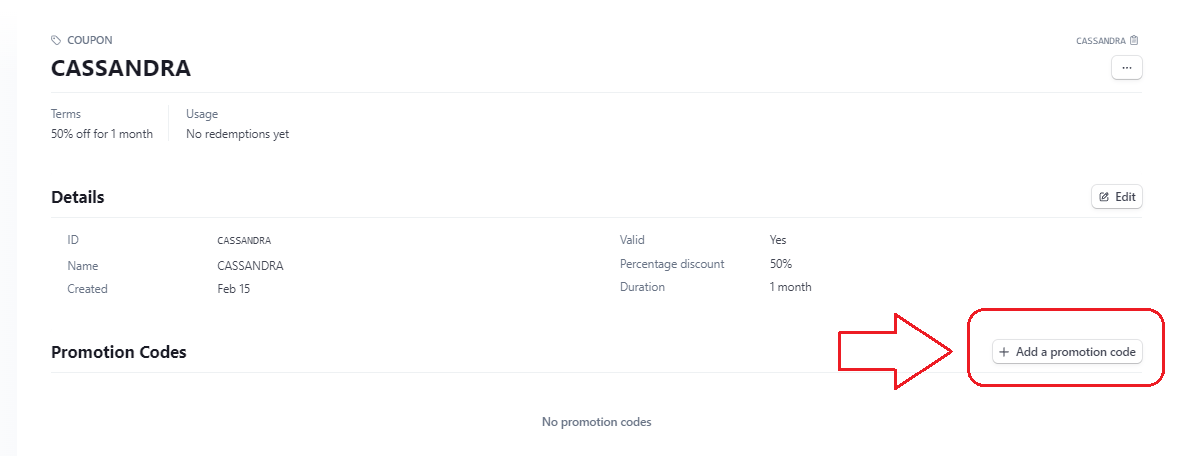
7. Enter the same coupon value, select preferred settings and click Add promotion code:
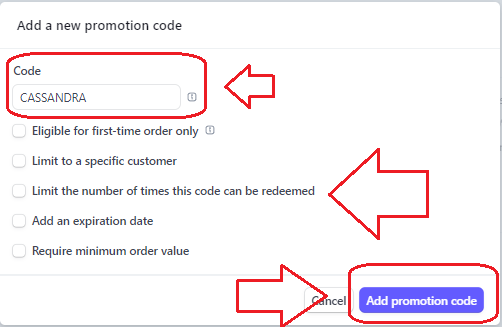
8.Now coupon is live an you can test it.
Note: It does not work if Stripe discount coupon is set at 100% or the value that is equal to the reports price. It has to be at least 1$ (taking currency exchange rate into account) for it to trigger the webhook and for reports to be uploaded/emailed (if email set up).
Still have questions? Contact Stripe Customer Service.