
Creating a smooth client booking and payment system is essential for coaches, consultants, and service-based businesses, including Human Design and Astrology Practitioners who want to offer reading sessions. By connecting calendars, payment platforms, email workflows, and automation tools, businesses can simplify client experience and create a professional journey from booking to follow-up.
This guide explains how to properly configure a Human Design or Astrology booking system using Bodygraph GoHighLevel extension.
Connecting Payment Platforms for Session Sales
To begin selling sessions, businesses must integrate payment processors into their booking system. Popular payment solutions such as Stripe and PayPal allow businesses to collect payments directly during booking.
The platform supports multiple payment integrations, allowing flexibility depending on business needs. These payment systems are typically used for one-to-one session bookings rather than automated digital product sales.
Once connected, businesses can easily charge clients during the booking process, creating a seamless checkout experience.

Setting Up Calendar Integration
After connecting payment systems, the next step is linking the booking calendar.
Calendar integration allows businesses to:
Display available appointment slots
Send automatic meeting reminders
Sync appointments across multiple platforms
Connect video conferencing tools such as Zoom or Google Meet
Calendar settings are usually located in the profile settings section of the platform. Users can connect different calendar providers such as Google Calendar, Outlook, or iCloud. This ensures meetings automatically appear across all connected scheduling tools and devices.
Separating booking sessions into different calendars is recommended. This makes it easier to track appointments and organize multiple service offerings.


Creating Session Tags to Track Clients
Tags help businesses identify where leads and clients originate.
For example, businesses can create tags based on session types such as:
Introductory consultations
Advanced coaching sessions
Specialized services
Tags allow businesses to track booking sources and build personalized marketing workflows. Once a client books a session, tags can automatically be assigned to their profile. This makes it easier to segment clients and send targeted follow-up emails or offers.
Using tags also supports client journey mapping, allowing businesses to promote additional services or programs after initial bookings.

Creating Custom Fields for Client Information
Custom fields allow you to collect specific information from clients during the booking process. These fields store additional client details that are not included in the default GHL contact information and some, especially Human Design and Astrology aspects are very important to prepare for reading sessions.
Custom fields to consider:
Date of birth
Place of birth
- Time of birth
Personal intake questions
Custom fields are created inside the platform’s settings under the custom fields section. You should always check whether the platform already provides a default version of a field before creating a new one. Using duplicate fields can cause system conflicts or prevent information from appearing correctly in templates or forms.

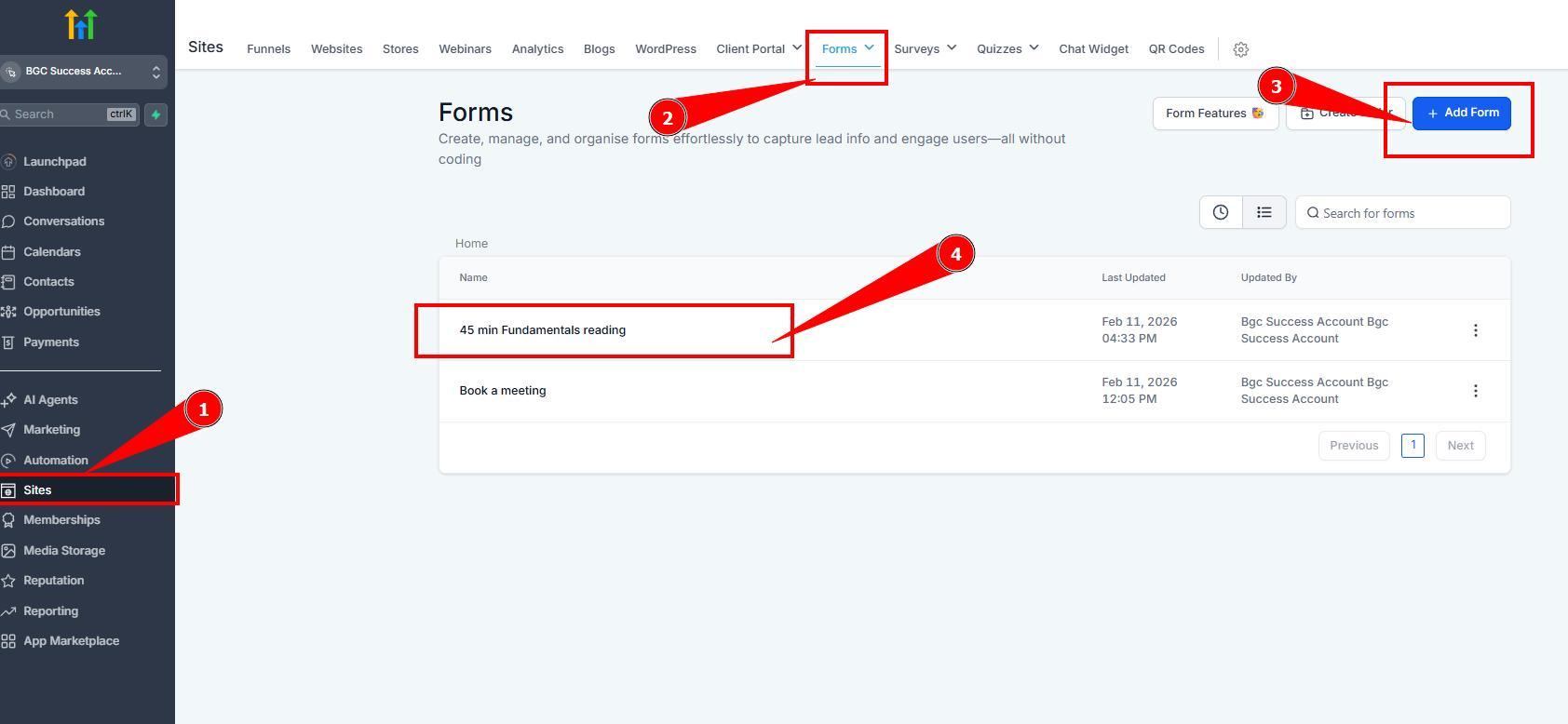
Creating Booking Forms
Booking forms collect client information and connect directly to calendars, automation workflows, and email templates.
When building forms, businesses should:
Add all required custom fields
Ensure fields are correctly linked to the contact database
Mark important fields as required
Test form submissions to confirm data flows correctly

Designing Professional Email Templates
Automated email templates improve client communication and brand consistency.
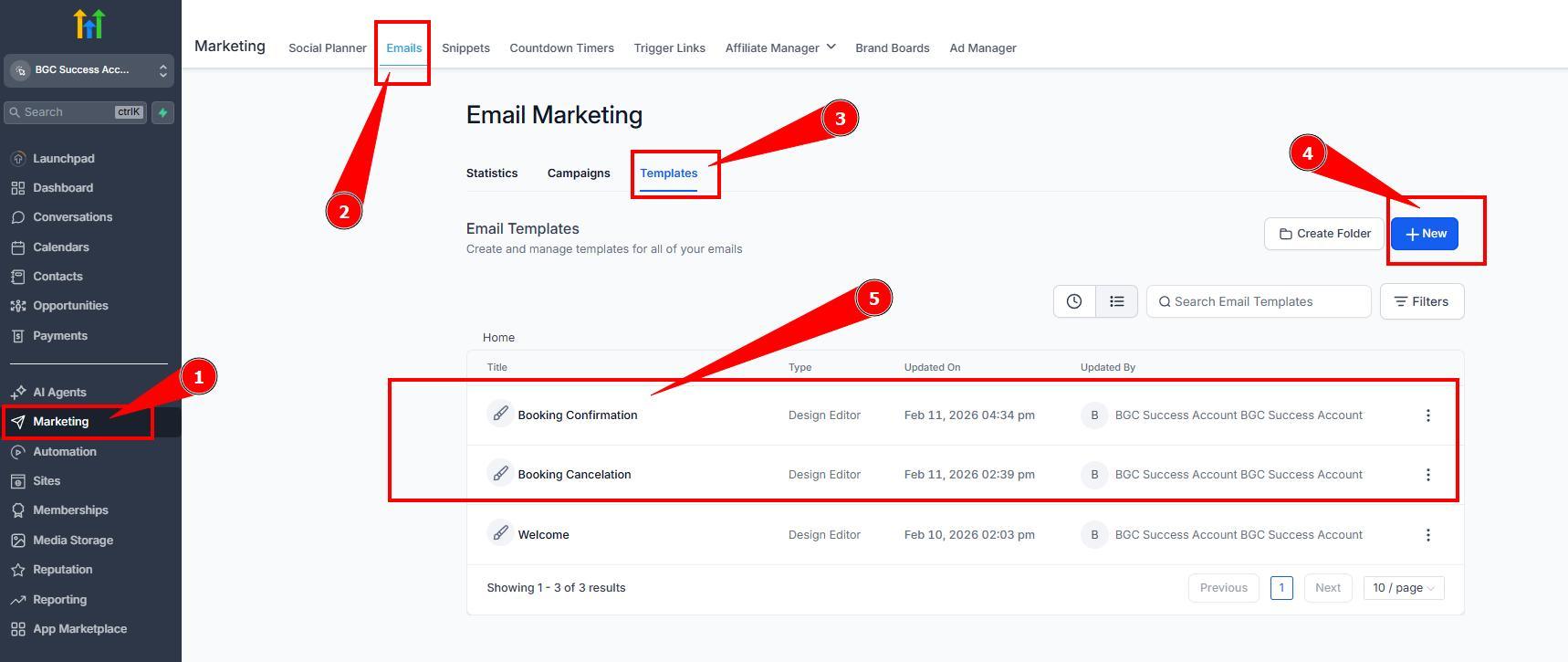
Important email templates include:
Booking confirmation emails
Cancellation emails
Reminder emails
Follow-up or feedback request emails
Branded email templates help reinforce brand identity. Businesses should use consistent colors, fonts, and logos matching their website or marketing materials.
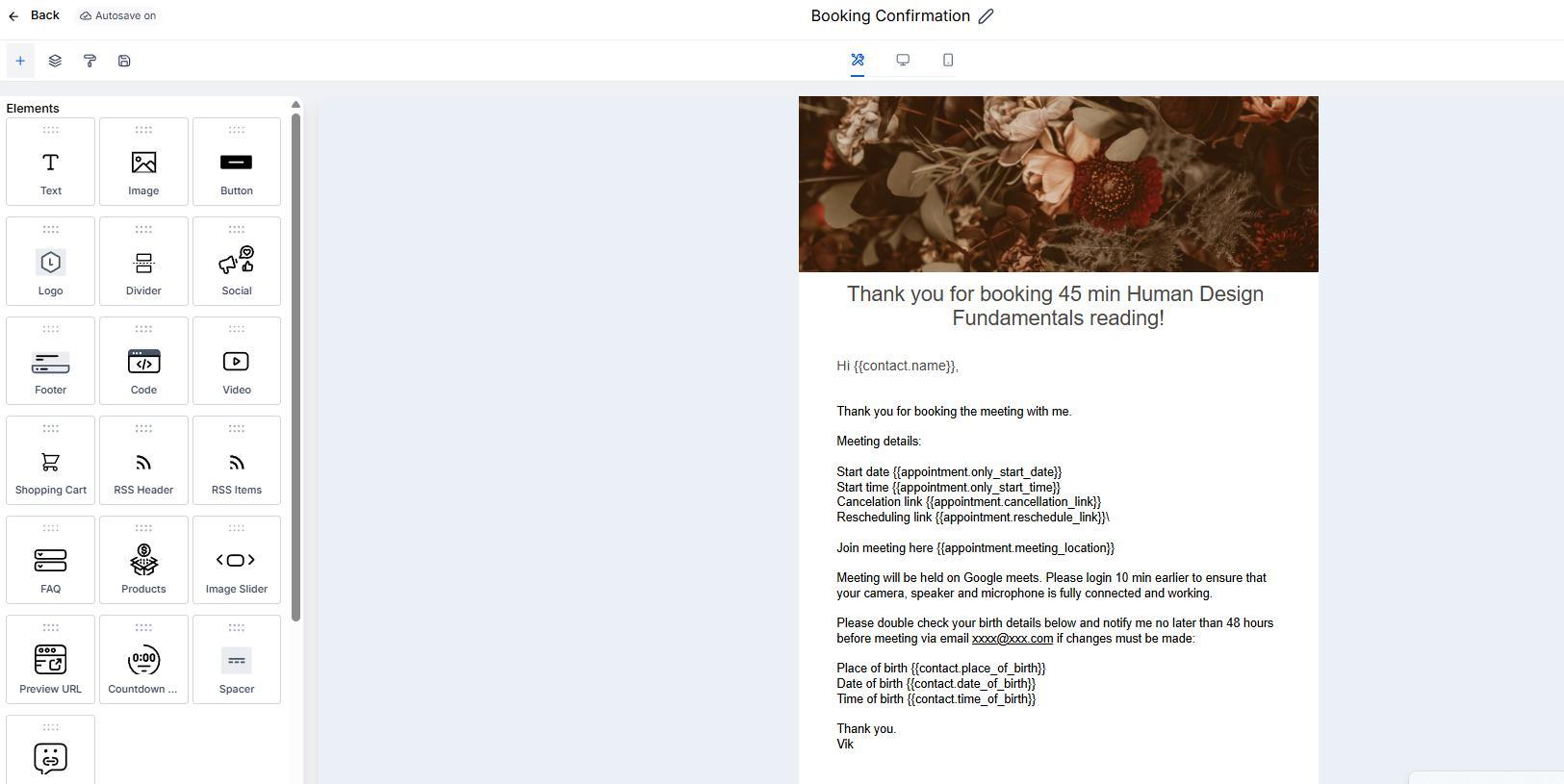
Confirmation emails should include:
Appointment date and time
Meeting location or video link
Cancellation or rescheduling options
Client details such as birth data or other intake information (if required)
Providing this information allows clients to verify details and reduces booking errors.
Automating Client Workflows
Automation workflows help manage the client journey without manual effort.
Common workflow automations include:
Assigning tags after bookings
Sending confirmation and reminder emails
Delivering educational or promotional email sequences
Encouraging clients to book follow-up sessions
For example, when a client books a session, a workflow can automatically tag them, send confirmation emails, and enroll them into a nurturing email sequence.
Automation allows businesses to guide clients toward additional services, coaching programs, or long-term engagement opportunities.


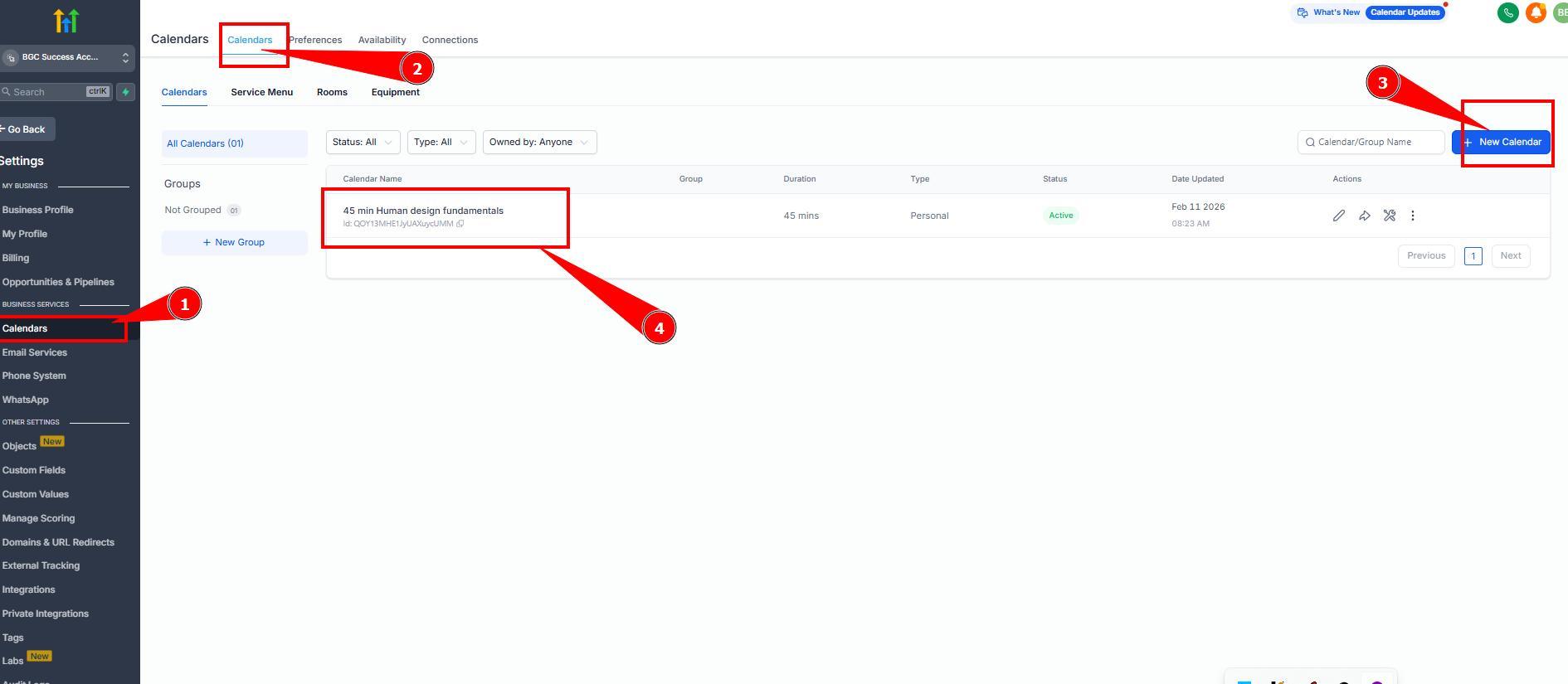
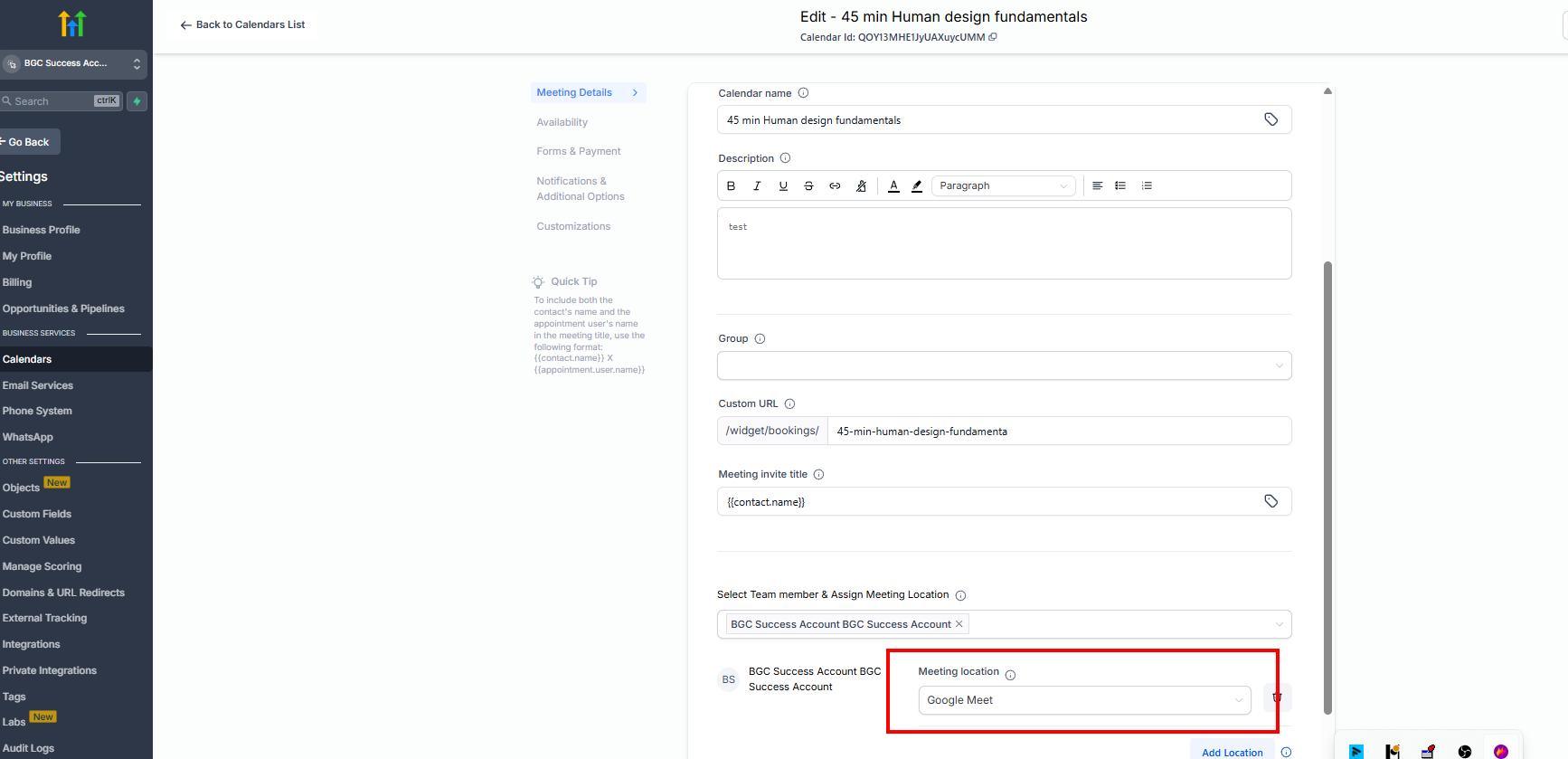
Launching calendar
Now it’s time to connect all settings to one booking calendar for the reading session:
– Naming it
– Assigning earlier connected Payment app
– Important: selecting location you connected meeting platform (that will autogenerate meeting link)
– Assigning earlier created form
– Assigning created email templates to the email automations
– Other customization setups and preferred setings
Testing the Booking System Before Launch
Before making the booking system public, you should test it thoroughly (ideally by small group of friends).
Testing should include:
Booking sessions from multiple devices
Confirming emails and reminders are sent correctly
Checking payment processing
Reviewing calendar synchronization
Gathering feedback from test users and proceed with final fixes and adjustments before launch.
Testing ensures the system runs smoothly and prevents client-facing errors.
Best Practices for Structuring Client Sessions
Long sessions can overwhelm clients with information. Breaking services into shorter, structured sessions, for example HD fundamentals only, HD gates only, Astrology basics only, etc. allows clients to choose topics that best fit their needs. This approach also increases opportunities for repeat bookings and deeper client engagement.
Video tutorial
Still have questions, is above guide outdated? Please message us on Live Chat or send an email to support@bodygraph.com.